- Summary
- Software version
- Reproducible in latest version?
- Environment details: compiler/interpreter, operating system, etc.
- Steps to reproduce
- Expected results
- Actual results
- Screen capture (if relevant)
- Give it a title
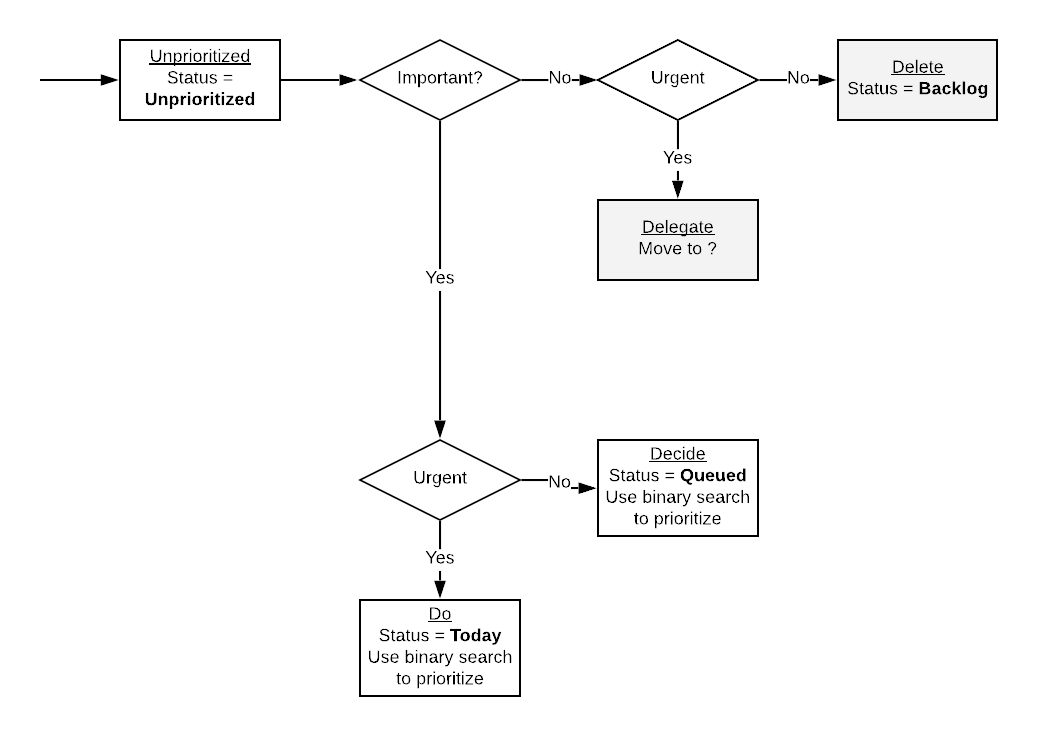
- Decide if it's important or not
- Decide if it's urgent or not
- Estimate the effort required to accomplish the task (in hours)
- Estimate the value the task brings (in $)
- Give it at least one label
- Give it an assignee
- Give a description if necessary
- Set a deadline if possible
- Set status to Unprioritized (ideally automatically/default)
- Indicate who requested the task
- Indicate which users/how many users would be affected by the task
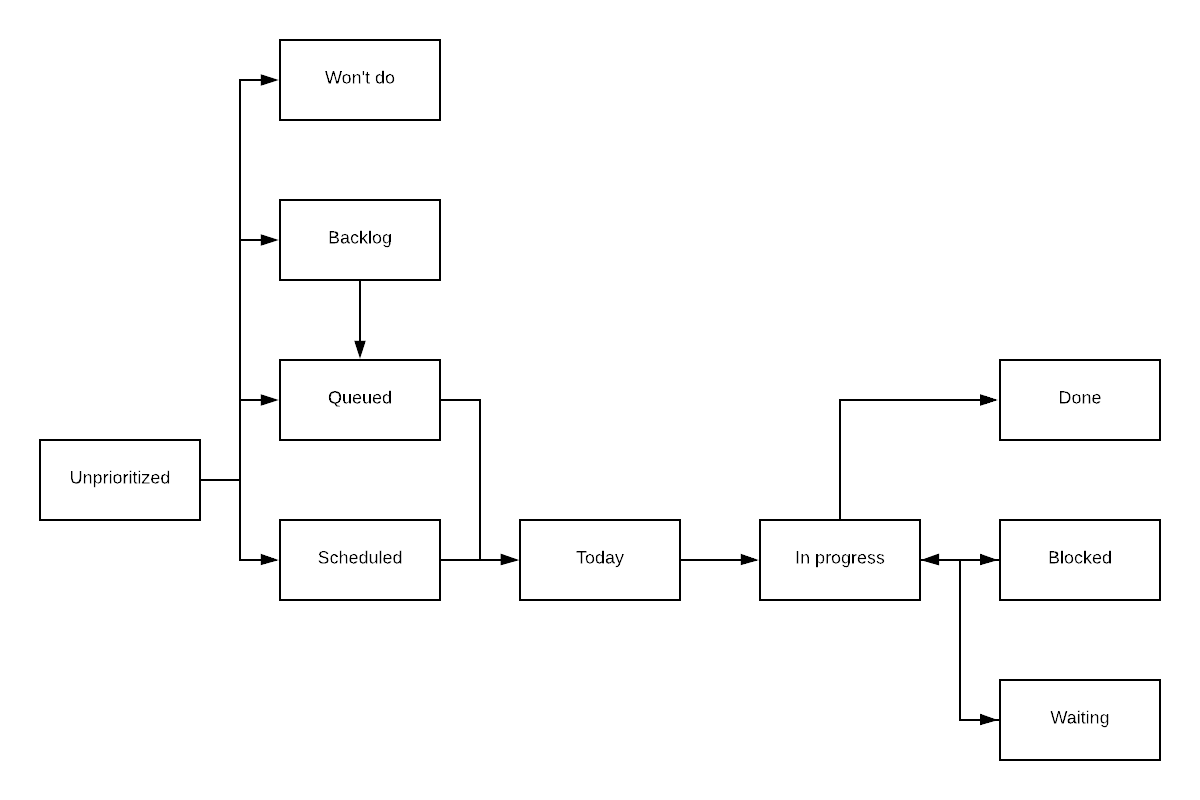
Unprioritized: New task are created as unprioritized, so as to avoid having to put them in a state immediately when creating them.Won't do: A task that ends up not being relevant or useful will not be acted further upon and set to "Won't do".Backlog: A task that is not of priority at the moment but something that would be worthwhile to do at some point in the future (although maybe never due to other priorities).Queue: A task with a priority that is not high enough to be done immediately but that should be done in the near future.Scheduled: A task that has been scheduled to be done by a specific date.Today: A task that is scheduled to be done today. Tasks picked from the queue are moved to today.In progress: Tasks that are were in progress yesterday but aren't blocked, waiting, or done are moved back to today, the queue, or the backlog.Blocked: A task that is blocked by something else. The task should be moved back to today when it is unblocked.Waiting: A task that is waiting for something to happen before it can be worked on. The task should be moved back to today when it is unblocked. The difference between a blocked task and a waiting task is that a blocked task is blocked by something that is not under your control, while a waiting task is blocked by something that is under your control.Done: A task that has been completed and does not require further action.
- Go through the tasks in the Do section, then the Decide section, then Delegate
Use Eisenhower matrix to determine task importance/urgency
- Tasks that are not important/not urgent are moved to the backlog.
- Tasks that are not important/urgent are delegated to someone else.
- Tasks that are important/not urgent should be scheduled.
- Tasks that are important/urgent should be done ASAP.
Using the estimated effort and estimated value of a task, you can compute the return on investment (ROI) of the task as estimated value divided by estimated effort.
For example, a task you estimate is worth 100 $ and takes 2 hours to complete will have a ROI of 50 \$/h.
Use the ROI of your tasks to prioritize them. You will want to complete the tasks which are likely to have the best return on investment.
The ROI metric will also give you clues about the task you should probably not spend your time on. If you are paid 50 $/h and a task has a ROI less than 50 \$/h, then it should probably be moved to the backlog and only reconsidered if its ROI changes.
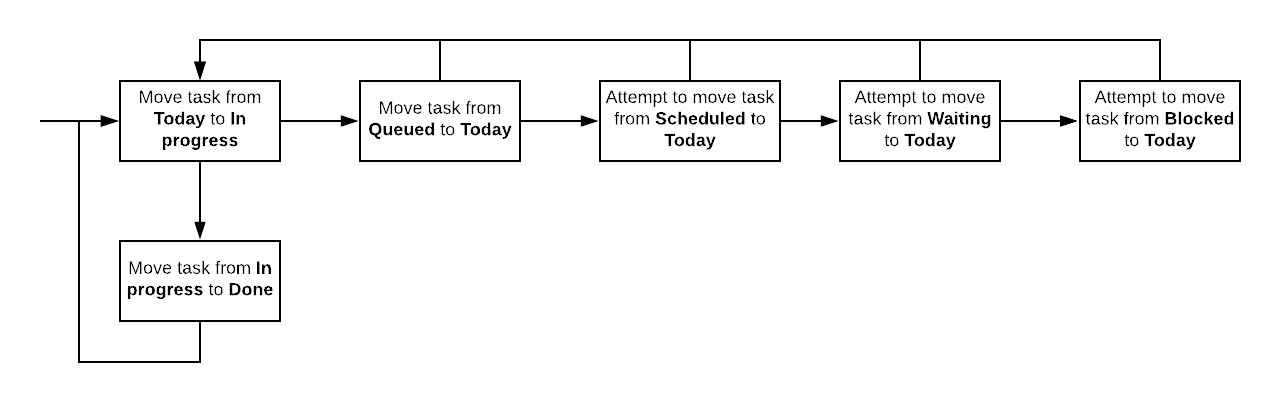
Unprioritizedtasks should be moved toQueued, given their priority compared to already queued tasks.- You should attempt to keep the
Unprioritizedtasks count to 0. - A task that is
Queuedshould have a deadline date. - Work on tasks
In progressfirst, then take tasks fromToday, then fromQueued. - When moving a task to
BlockedorWaiting, add a comment indicating why it is blocked/waiting and what needs to happen for it to be unblocked.
If you've never done task management before, I suggest you do not start by applying all the above at once.
First, start by simply recording the tasks you need to get done (title only).
Once you've recorded most of the tasks you have to deal with, start giving them an important/urgent assignation.
It will help you rapidly determine which tasks should be done and which ones are nice to have, but not critical, or even not really useful if you think about it.
Once you are able to have this information for most of your tasks, then you should start giving them effort and value estimates.
Once you've reached this point, you will have a much better grasp on the importance of your tasks, as well as their potential impact in terms of value, as well as to the amount of effort it will require from you.
Title(string): a high level description of the task in one sentence.Labels: a set of short identifiers relevant to the task.Status: the status of the task (see Statuses above).Assignee: who is assigned to complete the task.Important: is it important or not?Urgent: is it urgent or not?Estimated effort: effort to complete the task (in hours).Estimated value: estimated value of completing the task (in $).Description: a long description of what the task is about, possibly containing more context and a TODO list.Deadline: a time by which the task should be done or may result in the task losing value or causing issues.Who requested: the person who requested the task to be completed.Who is impacted: the people that will be impacted by the completion of the task.
- Tasks should not remain in the
In progressstate for extended periods of time. After approximately a week in that state, I would suggest re-evaluating whether this task is stillIn progressor should be moved back into theBacklog,Queued,ScheduledorTodaystate. The same should apply to theWaitingandBlockedstates.
Nowadays I do not write useful commit messages anymore.
The main reason is that most repositories I work in professionally use squash merges, meaning that all commits done in a branch are squashed into a single commit when merging the branch into the main branch.
The commit message of the squash commit is usually the title of the pull request, meaning that the individual commit messages are not very useful anymore.
The commit message ends up containing the PR description, which gives the what and why of the changes, which is generally enough.
With the rise of LLMs I have never found myself looking at the commit history and the commit messages to understand why things changed.
If something isn't working, I simply get the LLM to help me fix the problem.
- One liner describing what changed (not period terminated)
- A few lines describing in more details why things changed
- GPG signed commit
- Separate subject from body with a blank line
- Limit the subject line to 50 characters
- Capitalize the subject line
- Do not end the subject line with a period
- Use the imperative mood in the subject line
- Wrap the body at 72 characters
- Use the body to explain what and why vs. how
- 3 different environments: development, staging, production
- Write migrations for schema changes
- Use ORM if possible over raw queries
- Always make it possible for testers to report the version they tested against
- Simplest is to have a meta field in the head section
- Mockups
- SRS
- Database and software architecture
- Implementation
- Test/QA
- Deployment
- Use the task background + acceptance criteria as plan prompt (manual)
- Use the planning feature of the agent and let it generate a plan (LLM)
- Review the plan and adjust as necessary (manual)
- Ensure the presence of tests
- Let the agent implement the code based on the plan (LLM)
- Review the code implemented by the agent (manual)
- Ensure it meets the acceptance criteria
- Ensure code quality and standards
- Manually verify that functionality is working as expected (manual)
- Commit code on a branch (manual)
- Push to the central repository (manual)
- Verify that CI passes
- Create pull request (manual + LLM generated description)
- Make sure you understand what you have to implement
- Make it work
- Write a test for what you implemented
- Refactor the code for reusability/code standard
- Verify that your code passes linting and tests
- Commit your code on a branch
- Push to the central repository
- Verify that CI passes
- Create pull request
- Annotate code to explain intent of changes