The approach I thought of to solve this problem was to write your change, run your tests (most likely using PHPUnit), then create a diff/patch of those changes and use this information to determine whether the lines that are part of the diff are covered. It should be relatively straightforward to automate the process of generating a patch from within a git repository as well as running PHPUnit within a project’s directory (generating a clover.xml report). With this information in hand, it would be possible for a script to compute what is and isn’t covered by tests in the changes that you are about to commit.
I wrote PHP Code Coverage Verifier which takes care of reading the PHPUnit output (a clover.xml file) and a generated patch file and produce a report of the lines that are and aren’t covered.
An example of the script output is as follow:
php vendor/bin/php-code-coverage-verifier verify my-clover.xml my-diff.patch
Using clover-xml file: my-clover.xml
With diff file: my-diff.patch

Covered:
controller/admin/stocks.php line 15 - 21
controller/admin/stocks.php line 91 - 97
controller/search.php line 26 - 32
controller/search.php line 376 - 384
model/user.php line 34 - 41
model/user.php line 44 - 51

Not covered:
controller/account.php line 39 - 45
controller/admin/stocks.php line 27 - 33
controller/search.php line 36 - 42
controller/search.php line 187 - 193
model/user.php line 533 - 540

Ignored:
application/composer.json

Coverage: 40 covered (56.338%), 31 not covered (43.662%)
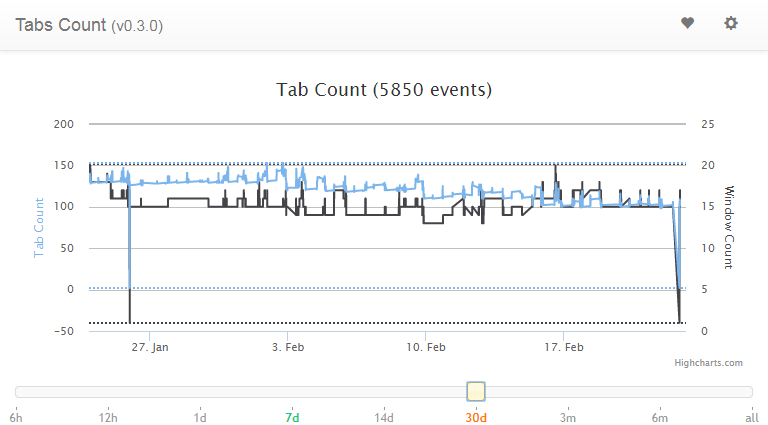
In January 2015 I wrote an extension for Chrome that allowed me to track how many tabs I had open. I called it the Chrome tabs count extension. It displays the number of currently opened tabs in the extension bar and when you click on the extension button itself, a chart is displayed with shows the tabs and windows count at each point a tab was opened/closed. This allows you to see the patterns of tabs creation/closing you have.
Such a tool will not help you reduce your tab count, but awareness is the first step toward reducing the number of tabs you have open at all times.
The second step is to taper (slowly reduce) the number of tabs you have open at all times. My strategy has been to reduce by 10 tabs each week the maximum number of tabs I had open. I started with over 160 tabs and I am now at 100 tabs after 6 weeks. I use the Loop Habit Tracker app to set up a daily reminder to make sure my tabs count is under the limit specified for this week and I try as hard as possible to finish the day with the number of tabs open below or at this limit.
I would separate the employees into multiple smaller companies, as large companies are difficult to wield. Furthermore, I think that it is useful for different companies to work on the same problem using different approaches, which is something I would promote. I see the need for a variety of positions:
(30%) Tooling and core technologies: Building tools that are used by other employees to make progress (visualization, compilation, hardware, database, network). (Bachelor/Master/PhD)
(25%) Applied research: Put the results of fundamental research into application in a variety of products. (Master/PhD)
(15%) Fundamental research: Work on scientific theories in order to improve our understanding of intelligence, learning, doing science, solving problems, programming, etc. (Master/PhD)
(15%) IT: Deal with infrastructure management and scaling. (Bachelor/Master/PhD)
(5%) Management: Ensuring that work is going in a specific direction and is not a random walk. (Bachelor/Master/PhD)
(5%) Data collector: Acquire data necessary for experiments done by fundamental researchers and applied research scientists. (Bachelor)
(5%) Administrative/HR/Facility management: Deal with business related tasks such as people management, facility management/maintenance, etc. (Bachelor)
I have taken a lot of pictures and I’d like to see where they were taken on a map. I also don’t want to have to upload those pictures to a server or download some software.
I’ve developed a simple tool called Photo geolocation which is a small client-side application. It uses leaflet to display the images on an OpenStreetMap map. The EXIF image metadata is extracted from the image by reading the image data using exif.js. From the EXIF image metadata we extract the GPS coordinates, which are then used to place a pin on the map at the appropriate location. It is possible to click on the pin to see what picture was taken at the provided location.
To use the tool, simply go to the website and drag and drop your images on the page. The images will be read by your browser, the EXIF image metadata read directly by the browser (nothing being sent to a server). The images with GPS coordinates will have a pin displayed on the map at the location they were taken, while those that do not have GPS coordinates will be simply logged to the browser console and not displayed.
As I am a developer, what is the most straightforward answer to this problem is to use a tool such as diff. When I write articles on my blog, I use Visual Studio Code which I have configured to save on window getting out of focus (or the current tab of the editor being changed). With this save event, I also create a git commit automatically with a very boring message “Automated save from VS Code.”. The point is not to have a fancy commit message, but to have a trace of when the changes where made. This allows me to offer to my visitors the ability to view the history of changes that were done to an article.
The downside to this approach is that it is not very easy to diff the article between two versions using the github web UI. It requires manually playing around the url, to provide the base and latest article SHA1 hash and to find the article in the list of files changed, which makes the experience rather painful and likely to lead nobody to do it.
Given that the git repository is available on my server where the blog is hosted, it would be possible for me to run a git diff command provided the last version seen by the visitor. This would allow me to present the changes that were done since the visitor last came. For instance, removal of sentences would be simply not displayed as removed since it is likely to be irrelevant to the visitor, however new sentences would be highlighted in green.
My approach is to write whatever I want to write about using whatever language I come up with first. Then I use a tool I’ve developed which I’ve called the vocabulary gradient. It is a very simple tool where you will generally copy and paste the article you’ve written and look at the result of the analysis. The tool uses a word frequency list as specified in the README.md. This list was built using the Project Gutenberg library, which makes the word frequency list a bit outdated.
The report generated by the tool presents the minimum, average, maximum and standard deviation of the index of the words used in the text you provided. Those numbers give you a rough overview of the difficulty of your text based on word frequency alone. The lower your average and maximum is, the simpler the article should be to understand An histogram is also generated, where the bins are based again on the index of the word in the frequency list. Finally, the provided text is rendered with each word index as a subscript. Words that are unknown are highlighted in yellow, while words for which the index is high are shaded with a darker shade of gray as their index increases.
With this information in hand, you can spot the words that have high word frequency indexes and try to replace them with lower index words.
I want my clients to share with me confidential data without revealing what the exact values are so that I can train machine learning models on this data.
I wrote a simple python package that uses pandas and scikit-learn to apply some simple transforms to the data. Some transforms that are applied to the dataset can change the distribution of the data, changing its statistical properties, while others preserve them but simply rescale the domain.
Given an anonymizer dataset using this tool, it is possible to do a preliminary data audit and possibly train machine learning models on the data to give a quick idea to clients whether their data looks promising or not without actually revealing the true numbers (except if desired).
The main concern with this approach is that most clients are not technical, and thus having them anonymize their data is generally not easy, if not impossible. Thus it means that such a tool is currently not applicable in the desired context.
To properly execute a project without a leader that makes important decisions, time is one of the most critical components. Without enough time, decisions are not consensus but decisions made by the individuals available at the time the decision is required. It is also important not to rush things as it will simply lead to bigger and bigger mistakes happening more and more quickly. At one point a few or many team members will realize they’ve moved too far too fast and many of the necessary pieces are missing, which makes the work they’ve done so far either irrelevant or of low value.
The team members also need to know each other well enough to know their strengths and weaknesses. Without this knowledge, weaknesses are often ignored because they are the weaknesses of everyone.
Decisions need to be reviewed regularly to ensure consistency. Since there is no single leader that keeps the project in their head and wants to see it to completion, it is necessary to ensure that the work that is planned and executed is consistent towards a common vision. Not doing so can lead the team to work on features that go in opposite directions, features that are not aligned with the users the project targets. Acceptable moments to review those decisions are during the planning sessions and the review/demo sessions.
Team members should often work in pairs with a different individual in the team to ensure that their understanding of the project gets discussed with different individuals with different positions. This avoids working with the same person that shares your opinion of the work to be done, while some other individuals may completely disagree with this opinion. Surfacing such differences of opinion early in the development process is critical since it can lead to work that is not aligned with the project.
Overall, we want to reduce as much as possible the time between the moment an individual or group of individuals have an incorrect understanding of the project’s goals and the correction of their understanding.
Over the past few years success for me has been defined less by goals and more by being able to work continuously on a process. For example, I might want to get better at writing. My goal is not something like “write one technical book by the end of 2020” but rather “write technical content daily”. This decreases the pressure and the need to perform while allowing me to do what I want.
I feel happier and more successful when I can keep doing the same thing over and over, even though I may have no motivation. It shows me that it’s possible to accomplish pretty much anything, as long as you’re willing to put in the effort.
Because I evaluate success this way, it is easy for me to track if I’m successful. I use the Loop Habit Tracker (an android app) to track whether I’ve worked on something I told myself I wanted to improve. My list started small and contained very mundane things such as “Bed is done”, “Empty table”, “No dirty dishes” and started including more and more habits, such as “Read 1 wikipedia article”, “Answer 1 problem” and “Answer 1 question”.
Being able to keep a good habit is what defines success to me. With the help of the app I’m able to add more and more habits without forgetting the previous ones since I’m reminded to do them at the desired weekly frequency.